revq guide
revq is a review queue for one maintainer. It watches the pull requests waiting on your review, has Claude Code draft inline comments for them, and lets you approve, edit or drop those comments before anything reaches GitHub.
Set it up
revq needs two credentials. Both go in a .env file next to compose.yml.
A GitHub token
revq reads pull requests and posts reviews as the owner of this token, so use a token for your own account.
- A classic token with the
public_reposcope covers public repositories. Userepoif you also review private ones. - A fine-grained token works only for repositories whose owner allows them. It needs read and write access to pull requests, and to issues if you turn on auto label.
- A read-only token is enough to fill the board and draft reviews. Posting needs write access.
Put it in .env as GITHUB_TOKEN.
Claude Code access
The agent is the claude command-line tool, which the Docker image already contains.
Give it one of these:
- Your Claude subscription. On any machine where you're signed in to Claude Code, run
claude setup-tokenand put the result in.envasCLAUDE_CODE_OAUTH_TOKEN. - API billing. Put an API key in
.envasANTHROPIC_API_KEY.
Deploy with Docker
git clone https://github.com/msyavuz/revq
cd revq
cp .env.example .env        # then fill in the two credentials
docker compose up -d
This pulls the published image ghcr.io/msyavuz/revq and starts it. revq now listens
on port 8080 of the server. Open http://<server>:8080.
Images are built for Intel/AMD and ARM servers. compose.yml uses the latest tag;
change it to a version such as ghcr.io/msyavuz/revq:v0.1.0 if you'd rather choose when
to update.
To build from the source checkout instead of pulling, switch the image line in
compose.yml for build: . as its comment describes, and run
docker compose up -d --build.
Everything revq stores (settings, the board, drafts, your account) is one SQLite file in
the revq-data Docker volume.
If you put revq behind a reverse proxy with HTTPS, have the proxy send the
X-Forwarded-Proto header so the sign-in cookie is marked secure.
Run without Docker
revq is a single program. Each release has it
ready-built for Linux and macOS, on Intel/AMD (amd64) and ARM (arm64).
It needs the Claude Code command-line tool on the same machine. Install that first, as the user revq will run as:
curl -fsSL https://claude.ai/install.sh | bash
Then download revq and start it:
curl -fsSLO https://github.com/msyavuz/revq/releases/download/v0.1.1/revq_v0.1.1_linux_amd64.tar.gz
tar -xzf revq_v0.1.1_linux_amd64.tar.gz
cd revq_v0.1.1_linux_amd64
GITHUB_TOKEN=<your token> ./revq
Without GITHUB_TOKEN set, revq uses the token from a signed-in gh. Without a Claude
token set, it uses your existing claude sign-in.
By default this listens on 127.0.0.1:8080, reachable only from the same machine. To
reach it from other devices, set REVQ_ADDR=:8080.
As a service on a Linux server
The download includes revq.service, a systemd unit that runs revq as its own user and
keeps its data in /var/lib/revq.
sudo useradd --system --home-dir /var/lib/revq --create-home --shell /usr/sbin/nologin revq
sudo install -m 755 revq /usr/local/bin/revq
sudo install -m 644 revq.service /etc/systemd/system/revq.service
sudo install -d -m 750 -o root -g revq /etc/revq
Put the settings in /etc/revq/revq.env, readable only by root and the revq group:
GITHUB_TOKEN=<your token>
CLAUDE_CODE_OAUTH_TOKEN=<token from claude setup-token>
REVQ_ADDR=:8080
REVQ_CLAUDE_BIN=/var/lib/revq/.local/bin/claude
REVQ_CLAUDE_BIN is where the Claude Code installer puts the tool when run as the
revq user:
sudo -u revq env HOME=/var/lib/revq bash -c 'curl -fsSL https://claude.ai/install.sh | bash'
Then start it:
sudo systemctl enable --now revq
To update, let revq replace itself with the latest release, then restart it:
sudo revq update
sudo systemctl restart revq
revq update downloads the release for your machine, checks it against the release's
checksum, and swaps the binary in place. Your data is untouched. To build from source instead you need Go 1.25 or newer:
go build -o revq ./cmd/revq.
| Variable | Default | What it does |
|---|---|---|
GITHUB_TOKEN |
token from gh |
GitHub access, as described above |
CLAUDE_CODE_OAUTH_TOKEN |
local claude sign-in |
Agent access through your subscription |
ANTHROPIC_API_KEY |
unset | Agent access through API billing |
REVQ_ADDR |
127.0.0.1:8080 |
Address to listen on (:8080 in the Docker image) |
REVQ_DB |
revq.db |
Where the SQLite file lives (/data/revq.db in the Docker image) |
REVQ_CLAUDE_BIN |
claude |
Path to the Claude Code command |
REVQ_CACHE |
checkouts next to the DB |
Where repositories are cloned for the agent to read (/data/checkouts in the Docker image) |
First sign-in
- Sign in as
adminwith the passwordadmin. - revq sends you to the Account page. Set your own password; nothing else works until you do. The default stops working as soon as you save.
- Go to Settings and add a repository as
owner/name.
When you add a repository you choose what revq tracks in it:
- Review requests for me (the default): pull requests where your review is requested, directly or through a team, plus ones you've already reviewed.
- All open PRs: every open pull request updated recently.
The first sync runs straight away. After that revq checks GitHub every two minutes, or when you press "Sync now". It only makes outgoing requests, so it needs no public address.
The board
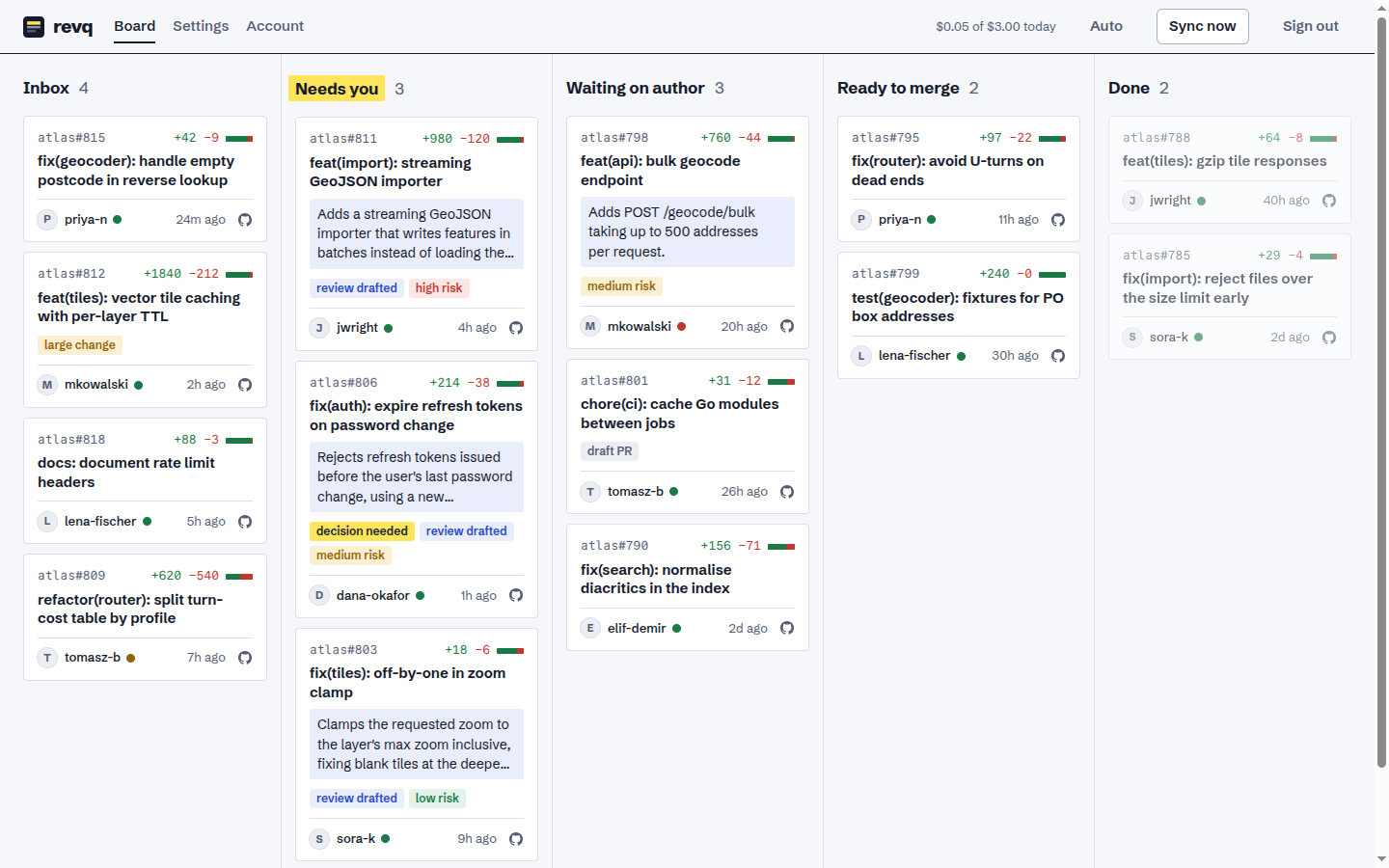
The board reads left to right.
| Lane | What's in it |
|---|---|
| Inbox | Your review is requested and nothing has been drafted yet |
| Needs you | A drafted review is waiting for you |
| Waiting on author | You've reviewed, or the PR is a draft, has failing CI, or has changes requested |
| Ready to merge | Approved, with CI not failing |
| Done | Merged or closed in the last seven days |
On a card:
- The repository and number, and the lines added and removed. Changes of 1,500 lines or more are marked "large change".
- Once a review has been drafted: a one-sentence summary of what the PR does and a risk level. Both come from the agent and are never posted.
- The author, a dot for CI (green passing, red failing, amber running), and when the PR was last updated.
- A GitHub icon that opens the PR on GitHub.
Above the lanes you can filter the board by repository, by author, and by words in the title or a PR number. The filter is part of the page's address, so you can bookmark a filtered board, and it stays in place while the board refreshes.
Click a card to open it. Hover over a card for Draft review, which asks the agent to review that PR; the card moves to "Needs you" when the draft is ready.
Drag a card to another lane to pin it there. The pin lasts until the author pushes new commits, and you can remove it from the PR's page.
Reviewing a pull request
A PR's page shows the author's description first, then revq's draft in a blue block. The blue block is always the agent's writing. Nothing in it is on GitHub until you send it.
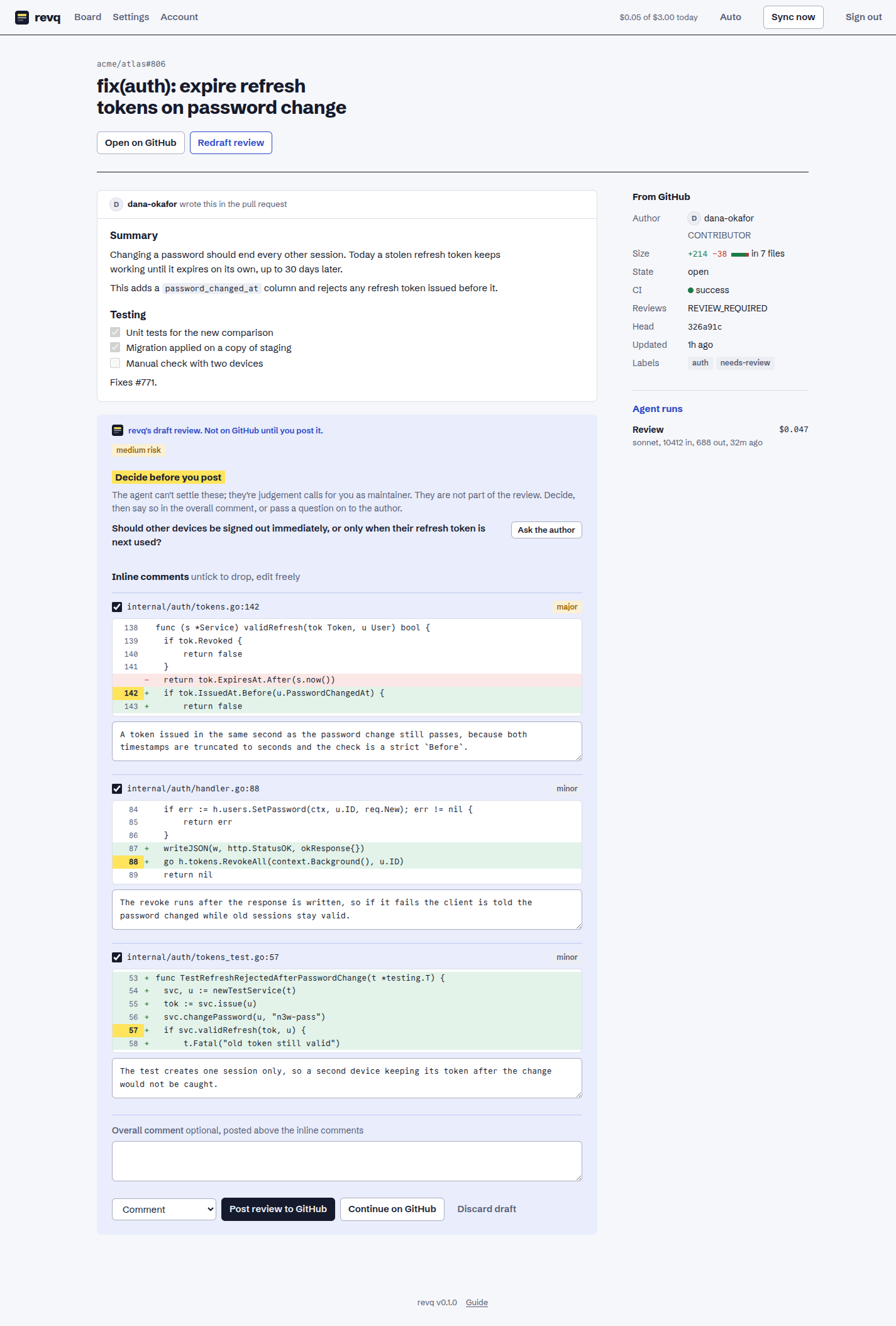
A draft is a list of inline comments. Each one shows the code it is about, with the commented line's number highlighted, a severity (blocker, major, minor), and the comment text. The severity is only for you; what gets posted is the comment text alone.
- Read each comment against its code. Edit the text if you want to say it differently.
- Untick any comment you don't want posted.
- If there is a "Decide before you post" list, those are judgement calls the agent can't make for you, such as scope or a breaking change. They are not posted. Decide, or press "Ask the author" to add one to your overall comment.
- Add an overall comment if you want one. It's optional.
- Choose Comment, Request changes or Approve, then send.
There are two ways to send:
- Post review to GitHub publishes it immediately.
- Continue on GitHub puts it on the PR as a pending review that only you can see. Follow the link, check the comments next to the full diff, and submit from GitHub's "Finish your review" button. GitHub allows one pending review per PR, so this fails if you already started one there.
After you post, the card moves to "Waiting on author". When the author pushes and asks for your review again, it comes back to Inbox.
"Redraft review" replaces the current draft, including your edits. If the draft says it was written before the latest commits, redraft it.
When the agent has read the whole change and found nothing, the draft opens with a Looks ready to merge block: a few bullets on what the change does and what's worth verifying after merge, plus CI, the number of unresolved review threads on GitHub, and the PR's review state. It is for you only and is never posted. It means the agent found nothing in the diff, not that the change is safe: the agent doesn't run the code. Approving is still your click, and revq never approves by itself. The card is marked "looks ready" on the board until the author pushes again.
A yellow "Partial review" line means the PR was too big to read whole and tells you how many files the agent read.
Automation
Everything is off by default, so the agent only runs when you press "Draft review". The switches are in Settings under "Default autonomy". Each repository's row has the same three switches: tick what you want for that repository and save. A repository whose switches match the defaults keeps following them; "Use the defaults" removes a repository's own settings.
- Auto review drafts a review for every PR waiting on you, once per commit. It does not redraft while a draft is still waiting for you.
- Auto post publishes drafts without asking. It always posts as a plain comment and never approves or requests changes.
- Auto label applies labels the agent suggests, chosen only from labels the repository already has.
Bot PRs and draft PRs are skipped by auto review unless you tick their boxes.
Trusted authors are auto reviewed even when the repository's switch is off. List their GitHub usernames in Settings, or press "Trust this author" on one of their PRs. It applies to all their pull requests in every repository revq tracks.
You can also decide per pull request. On a PR's page, the Auto review this PR switch turns it on for that PR while the repository's setting is off, or off for that PR while the repository's is on. Turning it on drafts a review straight away and again whenever the author pushes and your review is requested, including for bot and draft PRs. "Use the default" removes the exception. The board marks PRs that have one.
Keeping cost down
A review of a few hundred changed lines costs a few cents. These settings control it:
- Daily budget. When today's spend reaches it, the queue pauses until tomorrow. The header shows spend against the budget.
- Max per agent call. A ceiling for one call.
- Review model. Any model name the
claudecommand accepts. - Review chunk size and max chunks. A big PR is read in chunks, largest changes first, one agent call per chunk. More chunks means more of a huge PR gets read, and more calls.
- Extra paths to keep out of the model. Lockfiles, generated and vendored files are skipped already. Add your own, one pattern per line.
- Review guidelines. Your project's conventions, sent with every review. Keep it short.
- Review from the diff alone. By default the agent gets a read-only checkout of the repository at the PR's commit, so it can read callers and tests beyond the changed lines, plus the PR's discussion so far. That makes reviews better and dearer: more tokens, and tool calls the agent decides on. Tick this to review from the diff only.
Notifications
revq can message you when a PR lands in "Needs you". Fill in either or both under Settings, then press "Send test notification".
- Slack, or anything that accepts Slack's incoming-webhook format: paste the webhook URL.
- Telegram: create a bot with @BotFather, paste its token, and enter your chat ID. Send your bot a message first so it's allowed to write to you.
Maintenance
Update: the bottom of every page says when a newer version is out. With Docker:
docker compose pull
docker compose up -d
Without Docker: sudo revq update, then sudo systemctl restart revq.
Updating keeps your board, drafts, settings and sign-in. revq upgrades its own data on start and syncs with GitHub straight away; nothing is reviewed again.
The running version is shown at the bottom of every page, and by
docker compose run --rm revq version. To go back to an earlier version, set that
version's tag on the image line in compose.yml and run docker compose up -d.
Your data upgrades itself when a newer version starts; going back to an older one
after that is not guaranteed to work, so take a backup first.
Back up: stop revq so the file is complete, copy it out of the volume, and start again.
docker compose stop
docker compose cp revq:/data/revq.db ./revq-backup.db
docker compose start
Change your password or username: the Account page. Changing the password signs out every other browser.
Forgot your password:
docker compose run --rm revq reset-password
Without Docker, run ./revq reset-password. This puts the account back to admin /
admin, and you set a new password on the next sign-in. Nothing else is touched.
When something goes wrong
- The board is empty after adding a repository. Open Settings; a sync error is shown in red under the repository. A token without access to that repository is the usual cause. With "Review requests for me", an empty board can also just mean nobody is waiting on you.
- "Draft review" never finishes. Open the PR's page. Failed agent runs are listed in
the side rail with the error. Check that the Claude token in
.envis valid. - The header says "agent paused". You've hit the daily budget. Raise it in Settings or wait until tomorrow.
- "Too many failed attempts" at sign-in. Eight wrong passwords from one address lock that address out for ten minutes.
- Sending a review fails. revq shows GitHub's error. The common ones are a token without write access, trying to approve your own PR, and an existing pending review when using "Continue on GitHub".
Limits
- GitHub only, one account, one token.
- The agent reads a checkout of the repository but never runs anything in it: no tests,
no build, no shell. A large repository costs disk space under
REVQ_CACHE(a blobless clone plus one checkout at a time) and the first review of it waits for the clone. - Raw HTML in a PR description is not shown.